
The ReturnZap Zendesk Integration
The ReturnZap Zendesk Integration
The ReturnZap Zendesk integration displays your customers' return details directly inside the Zendesk Support ticket sidebar.
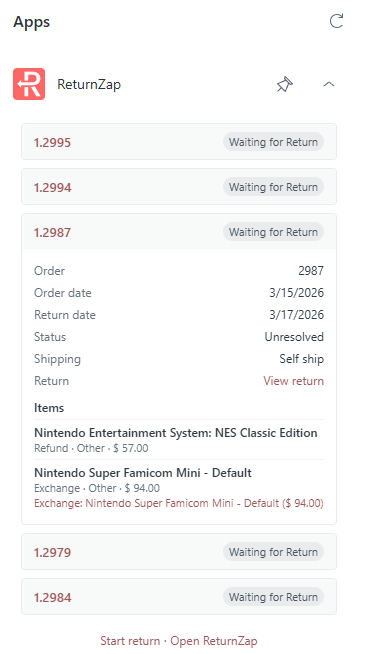
When an agent opens a ticket, they can instantly see the customer's recent returns including status, shipping, tracking, items, and exchange information, all without leaving Zendesk.
Note: The Zendesk integration is available on ReturnZap Advanced and Enterprise plans.
What you'll see in Zendesk
When a support agent opens a ticket, the ReturnZap sidebar automatically looks up the requester's email and shows:
- Up to 5 recent returns (most recent first), each with:
- RMA number
- Order name and order date
- Return date and current stage
- Resolved status (e.g. Pending, Approved, Rejected)
- Shipping method and delivery status
- Tracking number (with link if available)
- Link to view the return in Shopify
- Items in each return, including:
- Product name, SKU, and quantity
- Return type and reason
- Customer comments
- Exchange details (if applicable)
- A link to open ReturnZap directly
Returns are matched by the ticket requester's email address, including gift return recipients.
How to set up the integration

Step 1: Install ReturnZap from the Zendesk app marketplace
Step 2: Connect in ReturnZap
- In ReturnZap, go to Settings → Integrations
- Scroll down to the Zendesk section
- Enter your Zendesk subdomain (e.g. if your Zendesk URL is
acme.zendesk.com, enteracme) - Click Connect
- Important: An API token will appear. Copy it and save it somewhere safe — you won't be able to see it again. If you lose it, you can regenerate a new one.
Step 3: Enter the API token in Zendesk
- Enter the API token from Step 2 above into the ReturnZap Zendesk application installation from Step 1
That's it! The ReturnZap sidebar will now appear on all support tickets.
Managing your connection
Regenerating your API token
If you need a new token (for example, if the original was compromised):
- In ReturnZap, go to Settings → Integrations → Zendesk
- Click Regenerate token
- Copy the new token — you won't be able to see it again
- In Zendesk, go to Admin Center → Apps and integrations → Zendesk Support apps
- Find ReturnZap, click Change settings
- Paste the new token and save
Warning: Regenerating the token invalidates the previous one immediately. Update it in Zendesk right away or the sidebar will stop working.
Disconnecting
To remove the integration:
- In ReturnZap, go to Settings → Integrations → Zendesk
- Click Disconnect
This revokes the API token. You'll also want to uninstall the ReturnZap app from Zendesk Admin Center.
Troubleshooting
| Issue | Solution |
|---|---|
| Sidebar shows "Failed to load return data" | Check that the API token in Zendesk matches the one in ReturnZap. Try regenerating the token. |
| Sidebar shows "Invalid API token" | The token in Zendesk is incorrect or was regenerated. Update it in Zendesk Support apps → ReturnZap → Change settings. |
| Sidebar shows "Feature not enabled" | The Zendesk integration requires the Advanced or Enterprise plan. Upgrade your plan in Settings → Plan. |
| Sidebar shows "No returns found" | The ticket requester's email doesn't match any returns in ReturnZap. |
| Sidebar doesn't appear at all | Make sure the ReturnZap app is installed and enabled in Zendesk Admin Center → Apps and integrations. |
FAQ
Q: Does this work with Zendesk Chat or other Zendesk products?
A: Currently the integration only works with Zendesk Support (ticket sidebar).
Q: Can I use this alongside the Gorgias integration?
A: Yes, both integrations can be active at the same time. They operate independently.
Q: How often does the sidebar refresh?
A: The sidebar fetches data each time an agent opens a ticket. There is no automatic polling — click refresh or reopen the ticket to get updated data.
Q: Is there a cost for the Zendesk integration?
A: The integration is included in Advanced and Enterprise plans at no extra cost.