
EU Withdrawal Returns
ReturnZap supports EU Withdrawals alongside the standard return flow. Withdrawal mode is detailed below. It can be enabled in Settings > Return portal, under EU right of withdrawal
ReturnZap includes a dedicated withdrawal workflow that makes your return portal compliant with the EU Consumer Rights Directive. It runs alongside your standard returns process, so your existing returns are unaffected, and it gives EU shoppers a low-friction way to exercise their statutory right of withdrawal.
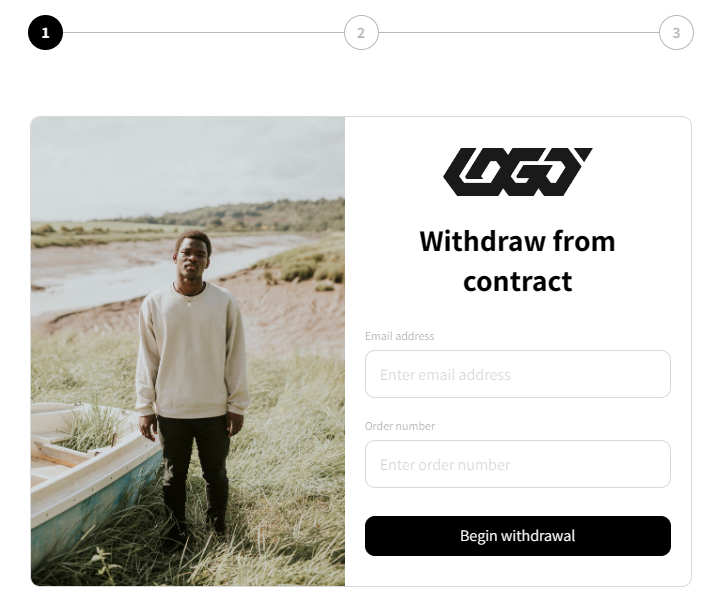
This article explains what the feature does, how to turn it on, the settings you can configure, and how withdrawals appear in your ReturnZap admin.
What is the right of withdrawal?
Under the EU Consumer Rights Directive, consumers can withdraw from a purchase contract within a set period, with minimal friction and without giving a reason. To stay compliant, the withdrawal flow is intentionally different from a normal return: no account login is required, no return reason is requested, and the number of steps is kept to a minimum.
When you enable withdrawal support, ReturnZap creates a parallel withdrawal process that sits next to your standard return portal. You get a separate embed link you can place anywhere on your storefront, for example a "Withdraw from your contract here" link in your footer, in your own local language. Customers who use that link enter withdrawal mode. Everyone else continues to use your normal returns portal exactly as before.
How withdrawal mode is different from a standard return
In withdrawal mode, ReturnZap automatically removes friction and disables steps that do not apply to a statutory withdrawal:
- No login or authentication. Lookup is by order number and email only
- No return reasons are requested.
- Customers can only submit withdrawals for refunds
- Upsell and incentive prompts are suppressed.
- ReturnZap uses compliant Withdrawal language throughout
The two withdrawal flows
Withdrawal mode automatically chooses one of two flows based on whether the order has shipped.
Pre-fulfillment withdrawal (order has not shipped)
When the entire order is still unfulfilled, the customer withdraws from the whole order in one click. There is no line-item selection, no shipping step, no label, and no fee shown.
On confirmation, ReturnZap:
- Creates a withdrawal record marked "Pre-fulfillment withdrawal."
- Sends the legally required pre-fulfillment confirmation email.
- In automatic handling, cancels the full order in Shopify: restocking the items, refunding to the original payment method, recording the cancellation as customer-initiated with a ReturnZap EU-withdrawal note, and suppressing Shopify's own cancellation email so only the ReturnZap confirmation is sent.
If the Shopify cancellation cannot be completed (for example, the order can no longer be cancelled), the withdrawal still stands as a declaration.
The record's cancellation state changes to "Manual action required" and the Shopify failure reason is shown in your admin so you can resolve it manually.
Post-fulfillment withdrawal (order has shipped)
When at least one item has shipped, the withdrawal is handled much like a standard return, using your existing return flow but in withdrawal mode. The customer can:
- Select one or more items (and quantities) to withdraw.
- See which fees apply.
- Choose a return shipping method, if return shipping is required.
- Confirm the withdrawal in one click.
No return reasons are requested. The withdrawal declaration is effective on submission without requiring your approval, while the physical return still proceeds through your normal workflow, so you can mark it received, review it, and process it as you would any return. The post-fulfillment confirmation email is sent automatically.
Withdrawal handling: automatic or manual
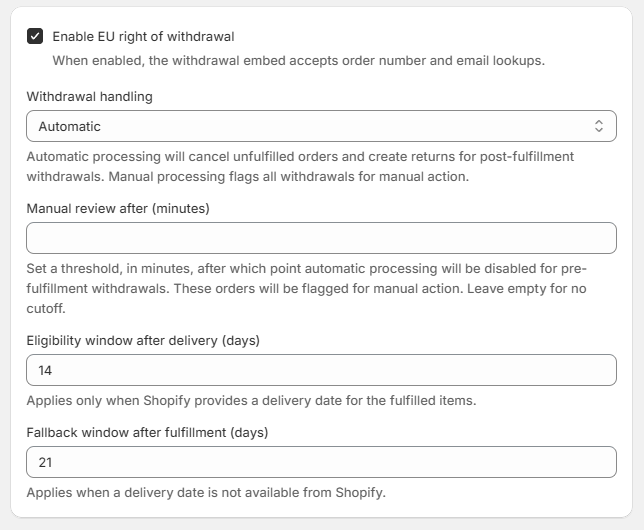
You choose how ReturnZap processes confirmed withdrawals using the "Withdrawal handling" setting on the Portal settings page. The default is Automatic, which matches ReturnZap's original behavior.
Automatic (default)
ReturnZap takes action on each withdrawal as soon as the customer confirms:
- Pre-fulfillment withdrawals are cancelled in Shopify immediately, as described above
- Post-fulfillment withdrawals create a withdrawal return that you receive, review, and process through your normal workflow.
In both cases the confirmation email goes out automatically and the record appears in your admin.
Manual (always manual)
In Manual handling, ReturnZap never cancels an order or creates an automated outcome on its own. For every confirmed withdrawal, it does three things:
- Presents the withdrawal language to the customer
- Sends the withdrawal confirmation email, stamped with the time of receipt.
- Creates a withdrawal record in your ReturnZap dashboard for you to review and act on.
From that point, all action is yours. You review the request and resolve it within the 14-day statutory withdrawal period in one of two ways:
- For an order that has not shipped, intercept and cancel it (refunding the customer).
- For an order that has shipped, provide return shipping details to the customer so they can return the items and become eligible for their refund.
Use Manual handling when you want a person to confirm every cancellation or return before anything happens. The customer is still acknowledged immediately and in writing, so you stay compliant.
Manual review cutoff for pre-fulfillment withdrawals
In Automatic handling, a pre-fulfillment withdrawal cancels the Shopify order the moment the customer confirms.
Because orders sent to a warehouse for fulfillment usually cannot be clawed back, the "Manual review after (minutes)" setting lets you cap how long automatic cancellation stays active.
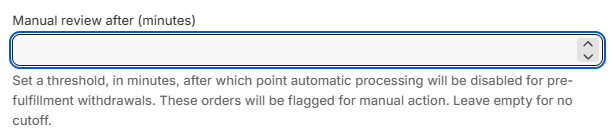
If a withdrawal arrives after the configured number of minutes have passed since the order was placed, ReturnZap skips the automatic cancellation and leaves the record for manual processing instead.
Leave the field empty for no cutoff. The setting applies to pre-fulfillment withdrawals only.
How ReturnZap determines the withdrawal window
The EU statutory withdrawal period runs for a set number of days after the customer receives their item. Two settings control how ReturnZap applies that window:
Eligibility window after delivery (days)
This is the statutory withdrawal window, 14 days by default, measured from the delivery date. ReturnZap uses it whenever it has both the line item and a delivery date for the fulfilled items from Shopify.
You can change the number to match your policy, but up to the end of the 14th day after delivery is the statutory minimum under the EU Consumer Rights Directive.
Fallback window after fulfillment (days)
ReturnZap does not always have a delivery date, since not every carrier syncs it. When the date is missing, ReturnZap counts from the fulfillment date instead, 21 days by default.
The longer default builds in a buffer for transit time so you stay compliant even when the actual delivery date is unknown. Adjust it to fit your typical shipping times.
How to enable withdrawal support

Withdrawal support is off by default and is enabled per shop.
- Go to ReturnZap, then Settings, then Portal.
- Under "EU right of withdrawal," turn on "Enable EU right of withdrawal."
- Choose your "Withdrawal handling" method (Automatic or Manual).
- Optionally set "Manual review after (minutes)" to cap how long automatic pre-fulfillment cancellation stays active.
- Set your "Eligibility window after delivery (days)" (default 14) and "Fallback window after fulfillment (days)" (default 21).
- Copy the withdrawal embed snippet shown on that page and place it on your storefront wherever you want the withdrawal entry point to appear (for example, your footer).
The withdrawal snippet is the same as your standard portal embed, with a withdrawal attribute added:
<script src="https://portal.returnzap.com/app.js" async></script>
<return-zap shop-id="YOUR-SHOP-ID" withdrawal></return-zap>
Your standard portal embed (without the withdrawal attribute) continues to work exactly as before. The two can coexist on the same storefront.
Confirmation emails
Every confirmed withdrawal sends exactly one confirmation email, which serves as the durable acknowledgment of the withdrawal under the EU Consumer Rights Directive.
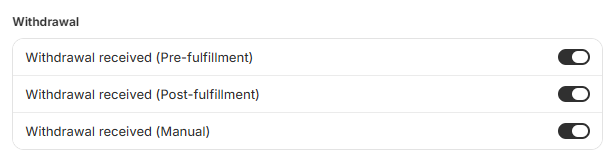
Email templates are editable in your notification settings (visible only while withdrawal support is enabled):
Withdrawals in your ReturnZap admin
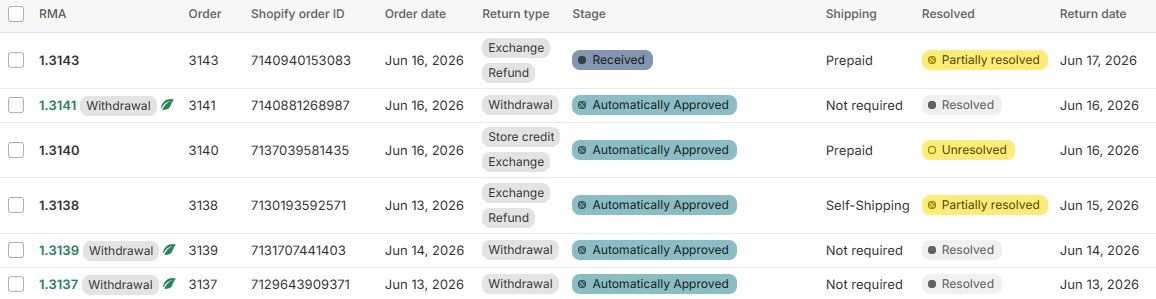
Withdrawals appear in the same Returns list as standard returns, clearly distinguished so your support team never treats a statutory withdrawal as a discretionary return:
- Returns list: withdrawal records show a "Withdrawal" tag.
- Return detail page: shows a prominent "Withdrawal" identifier and the subtype (Pre-fulfillment or Post-fulfillment).
- Pre-fulfillment records also show the cancellation state (Cancellation pending, Cancellation completed, or Manual action required) and, when a cancellation fails, the Shopify failure reason so you can act on it.
A completed pre-fulfillment withdrawal in Automatic handling shows that ReturnZap has cancelled the order and returned the items to your inventory.
A post-fulfillment withdrawal behaves like a standard return that you receive, review, and process.
In Manual handling, and in any case flagged by the manual review cutoff, the record waits for you to take the next step.
Scoping withdrawals with rules
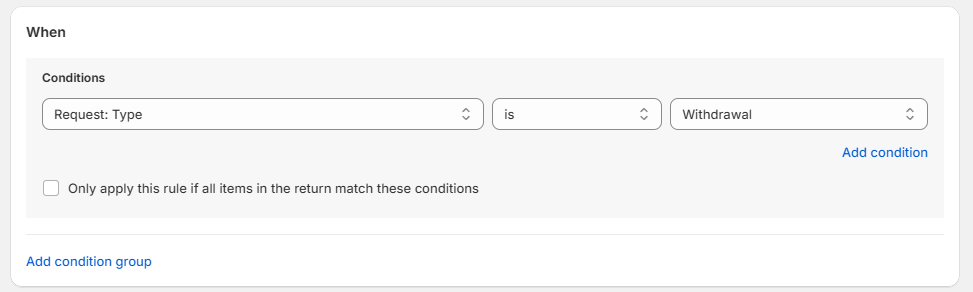
The withdrawal flow uses your existing ReturnZap rules engine, with a new request type condition so you can scope a rule to standard returns, withdrawals, or both. A rule with no request-type condition applies to everything, exactly as today.
In withdrawal mode, only legally compatible rule behaviors take effect:
- Deny an item with a message, for example to exclude customized or exempt products from withdrawal. This blocks the item in withdrawal mode without affecting standard returns.
- Waive the shipping fee.
Other rule behaviors (requiring approval, reason, photo, comment, or custom questions; routing to exchange or store credit; restocking fees; and upsell) have no effect in withdrawal mode.
The request-type condition appears in the rule builder only while withdrawal support is enabled.
Fees
ReturnZap does not charge shipping, label, or restocking fees for pre-fulfillment withdrawals. Post-fulfillment return shipping fees are not waived by default. If you want to cover return shipping, set up a withdrawal-scoped rule to waive the fee.
Turning withdrawal support off
If you disable withdrawal support, any withdrawals already in progress remain valid and continue through their workflow, and existing rules that reference the withdrawal request type keep working. New withdrawal submissions are no longer accepted. The withdrawal indicators on existing records stay visible so your team can still identify and handle active withdrawals.
Summary
Enabling EU withdrawal support gives any store selling into the EU a compliant, low-friction withdrawal process that runs in parallel with standard returns: a dedicated embed link, a choice between automatic and manual handling, a configurable statutory window with a fulfillment-based fallback, a manual review cutoff that protects orders already sent for fulfillment, legally required confirmation emails in four languages, and clear withdrawal labeling throughout your admin.
Disclaimer
This feature and article are provided for general informational purposes only and do not constitute legal advice. ReturnZap makes no representation or warranty that use of the withdrawal feature, or reliance on this article, will make your store compliant with the EU Consumer Rights Directive or with any other law, regulation, or requirement applicable to your business.
Compliance obligations vary by jurisdiction and by the specifics of your business, and they change over time. You are solely responsible for determining which laws and regulations apply to you, for configuring the feature appropriately, and for confirming that your returns and withdrawal processes meet those requirements. We strongly recommend you consult a qualified legal professional before relying on this feature for regulatory compliance.
ReturnZap accepts no liability for any loss, penalty, or claim arising from your use of this feature or from reliance on the information in this article.